ClaudeCode 功能分析#
核心概念#
-
Agentic Loop

-
工具(Tools): 文件操作,搜索,网络,执行,代码智能(Code Intellgence)
-
模型(Models)
-
工作会话(Work Session)
claude --continue --fork-session, --resume
-
上下文窗口
CLAUDE.md, Skills, SubAgent
-
常用
Esc 两次 撤回操作
Default, Plan, Auto AcceptEdit 模式
/init, /agents, /doctor
.claude/settings.json
ClaudeCode 扩展#
- CLAUDE.md adds persistent context Claude sees every session
- Skills add reusable knowledge and invocable workflows
- MCP connects Claude to external services and tools
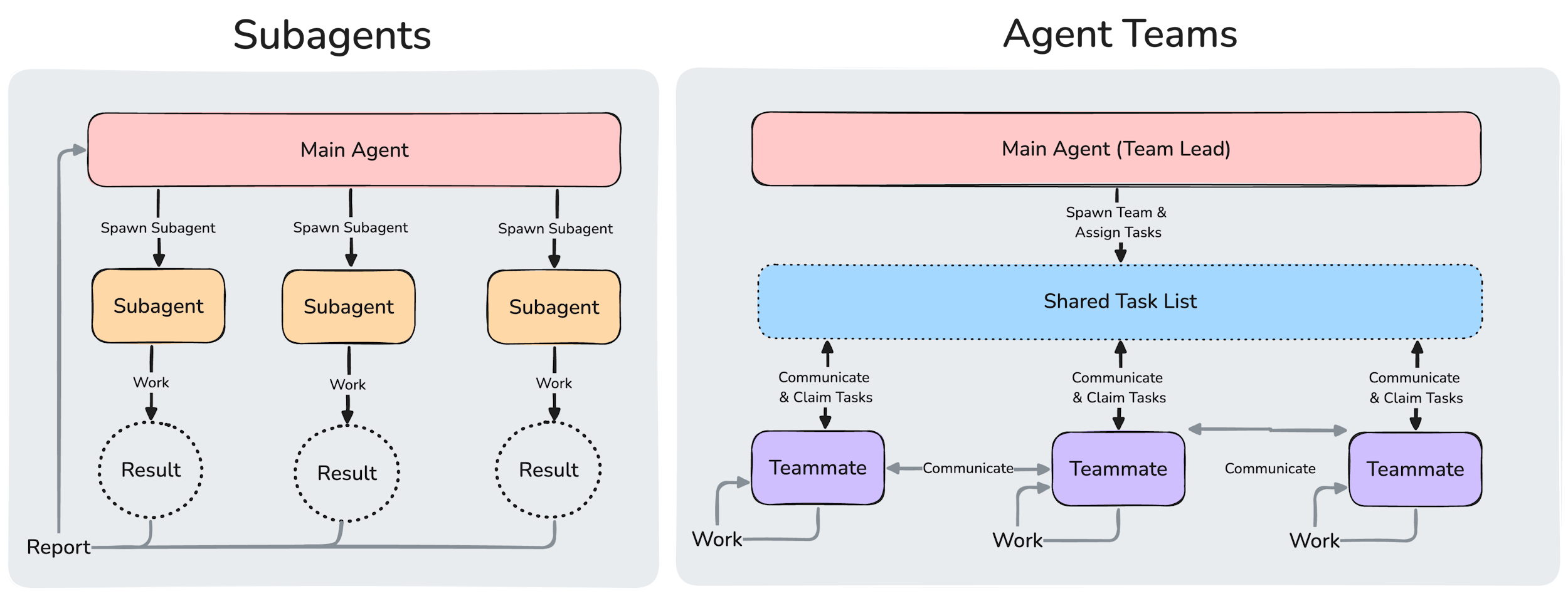
- Subagents run their own loops in isolated context, returning summaries
- Agent teams coordinate multiple independent sessions with shared tasks and peer-to-peer messaging
- Hooks run outside the loop entirely as deterministic scripts
- Plugins and marketplaces package and distribute these features
Skill#
Skill Sample#
~/.claude/skills/explain-code/SKILL.md:
简单Prompt:
---
name: explain-code
description: Explains code with visual diagrams and analogies. Use when explaining how code works, teaching about a codebase, or when the user asks "how does this work?"
---

When explaining code, always include:

1. **Start with an analogy**: Compare the code to something from everyday life
2. **Draw a diagram**: Use ASCII art to show the flow, structure, or relationships
3. **Walk through the code**: Explain step-by-step what happens
4. **Highlight a gotcha**: What's a common mistake or misconception?

Keep explanations conversational. For complex concepts, use multiple analogies.
工具使用
---
name: pr-summary
description: Summarize changes in a pull request
context: fork
agent: Explore
allowed-tools: Bash(gh *)
---

## Pull request context
- PR diff: !`gh pr diff`
- PR comments: !`gh pr view --comments`
- Changed files: !`gh pr diff --name-only`

## Your task
Summarize this pull request...
Skill 范围#
| Location | Path | Applies to |
|---|---|---|
| Enterprise | See managed settings | All users in your organization |
| Personal | ~/.claude/skills//SKILL.md |
All your projects |
| Project | .claude/skills//SKILL.md |
This project only |
| Plugin | /skills//SKILL.md |
Where plugin is enabled |
组合使用#
好的,这看起来是一个关于Claude(Anthropic的AI助手)开发模式(Patterns)的总结。我为您将这些模式的核心概念、工作方式和示例整理成一份清晰的中文表格:
| 模式 | 工作原理 | 示例 |
|---|---|---|
| 技能 + MCP (Model Context Protocol) | MCP提供连接能力;技能则“教会”Claude如何高效、正确地使用这个连接。 | MCP连接到你公司的数据库,一个专门的“数据库查询”技能会包含数据库Schema文档和最佳查询范例,指导Claude如何准确查询数据。 |
| 技能 + 子代理 | 一个“父级”技能可以创建多个子代理,让它们并行工作,各自处理一个大任务中的不同部分。 | 一个 /review(代码审查)技能启动后,会同时生成安全、性能、代码风格三个独立的子代理,它们分别在隔离的上下文中审查代码的不同方面,最后汇总结果。 |
| CLAUDE.md + 技能 | CLAUDE.md 文件定义始终生效的全局规则和风格;技能 则包含具体的、按需加载的参考资料和深度知识。 | CLAUDE.md 中规定“请遵循我们的API设计规范”,而一个专门的“API风格指南”技能则包含了所有详细的接口命名、版本管理、错误码等完整规范文档。 |
| 钩子 + MCP | 钩子 是Claude执行特定动作(前/后)的触发器,它可以通过MCP来调用外部服务或工具,触发实际的外部动作。 | 一个“编辑后”钩子被设置:每当Claude修改了源代码库中的关键配置文件,这个钩子就会通过MCP调用Slack的API,自动在指定频道发送一条变更通知。 |
上下文窗口#
上下文加载

Agent Team#
- SubAgent , AgentTeam 对比
- 额外配置
{
  "env": {
    "CLAUDE_CODE_EXPERIMENTAL_AGENT_TEAMS": "1"
  }
}四种权限模式#
Normal(默认):每个危险操作都需要你批准,包括文件写入、Shell 命令、网络请求。
Auto-accept:自动批准文件读写操作,仍对 Shell 命令提示。适合高强度重构 session。
Plan mode:纯只读,Claude 只分析和提出行动方案,等你批准后才执行任何写操作。
Bypass mode:完全跳过所有确认。仅在 CI/CD 等隔离环境中使用。
如何切换模式#
在 UI 中按 Shift+Tab 循环切换:normal-mode → auto-accept edit on → plan mode on。
在 Adapt settings.json 中设置默认模式:
{
  "defaultMode": "acceptEdits"
}实现完全自动化的几种方式#
方式 1:CLI 标志(单次 session)#
# 允许特定工具
claude --allowedTools "Bash(npm *)" "Edit" "Read"

# 跳过所有权限(YOLO 模式,仅用于容器/CI)
claude --dangerously-skip-permissions
--dangerously-skip-permissions 俗称"YOLO mode",会绕过所有权限检查,让 Claude 执行所有操作。
方式 2:defaultMode 设置#
{
  "defaultMode": "bypassPermissions"
}
```

这会自动批准所有工具调用,hooks 仍然执行并可阻断操作。仅在信任所有可能操作的受控环境中使用。

# ## 方式 3:PreToolUse Hooks(推荐用于生产环境)

从 Claude Code v2.0 起,Hooks 是控制自动审批的推荐方式,而非 `--dangerously-skip-permissions`。Hooks 支持多种事件类型,可以实现细粒度的、按工具类型的条件控制。

` ``json
{
  "hooks": {
    "PreToolUse": [
      {
        "matcher": "Bash",
        "command": "python3 validate_command.py \"$TOOL_INPUT\"",
        "timeout": 5000
      }
    ]
  }
}
```

Hook 输出 `{"hookSpecificOutput": {"permissionDecision": "allow"}}` 则批准,非零退出码则拒绝。

---

## 📝 CLAUDE.md — 上下文与指令

CLAUDE.md 文件按层级加载:
- **Global**:`~/.claude/CLAUDE.md`(适用所有项目)
- **Project**:项目根目录的 `CLAUDE.md`(自动加载)
- **子目录**:各子目录下的 `CLAUDE.md`(进入该目录时加载)

在 CLAUDE.md 中可以写:
```markdown
## 自动化策略
- 所有 npm 命令无需确认
- git commit 前先运行 lint
- 不要修改 production.config.* 文件

## 项目规范
- 使用 TypeScript strict 模式
- 测试文件放在 __tests__ 目录
```

---

## ✅ 推荐的自动化配置(团队场景)

**`.claude/settings.json`(提交到 git,团队共享)**:
```json
{
  "defaultMode": "acceptEdits",
  "permissions": {
    "allow": [
      "Bash(git status)",
      "Bash(git diff *)",
      "Bash(git add *)",
      "Bash(git commit *)",
      "Bash(npm run *)",
      "Bash(npm test)",
      "Bash(npm install)",
      "Read(**)",
      "Edit",
      "MultiEdit"
    ],
    "deny": [
      "Bash(rm -rf *)",
      "Bash(git push --force)",
      "Bash(sudo *)",
      "Read(.env*)",
      "Read(**/secrets/**)",
      "Bash(git push:*)"
    ],
    "ask": [
      "Bash(git push)"
    ]
  }
}
```

**`~/.claude/settings.json`(个人全局)**:
```json
{
  "defaultMode": "acceptEdits",
  "permissions": {
    "allow": [
      "Bash(curl *)",
      "WebFetch(*)"
    ]
  }
}
```

---

## ⚠️ 注意事项

截至 2026 年 2 月,deny 规则(尤其是 Read/Write 操作)存在已知 bug,可能不稳定。建议将 deny 规则与 PreToolUse Hooks 结合使用,通过 Hook 非零退出码来可靠地阻断工具调用,实现纵深防御。

常见 误区:避免允许所有 bash 命令,用具体 pattern 如 `Bash(npm run *)` 来限制范围;不要依赖 Bash 规则限制 curl URL 参数,应改用 `WebFetch` 的域名规则进行可靠过滤。